AI bookkeeping in Canada: a buyer's guide for BC small businesses
What AI bookkeeping can and cannot do for a Canadian small business, the sales tax risks, and 10 questions to ask before you choose software or a service.
In short
- AI is good at the repetitive parts of bookkeeping: suggesting categories for bank lines, matching payments, and reading bills.
- It is weak where Canadian rules need evidence and judgement: input tax credits, PST, mixed personal spending and anything unusual.
- Prefer tools where the AI suggests and a person decides, with a confidence score and an audit log of who changed what.
- Ask where your data is stored and processed, and whether you can export everything and turn the AI off.
AI bookkeeping is everywhere in software marketing, and it is easy to come away thinking the books can now do themselves. They cannot, but the useful parts are real. This guide is for BC small business owners deciding between AI bookkeeping software, a bookkeeping service that uses AI, or carrying on as they are. It explains where AI saves time, where it creates risk under Canadian tax rules, and the questions that separate a good tool from a demo.
What AI bookkeeping actually does
- Apply your bank rules
- Match transfers between your own accounts
- Match exact payments to open invoices
- Categorise new payees
- Read bills and receipts into drafts
- Suggest near matches and splits
- Claim ITCs only with a bill
- PST and place-of-supply questions
- Personal or business spending
- Year-end adjustments and your questions
Most of a bookkeeper's month is the same few tasks repeated hundreds of times. AI and simple automation help with three of them:
- Categorising bank and card lines. Rules handle the predictable ones ("Telus is always telephone"). Your history handles the regular ones. AI suggests an account for the rest, with a confidence level.
- Matching. Payments matched to invoices and bills, deposits matched to sales, transfers between your own accounts recognised.
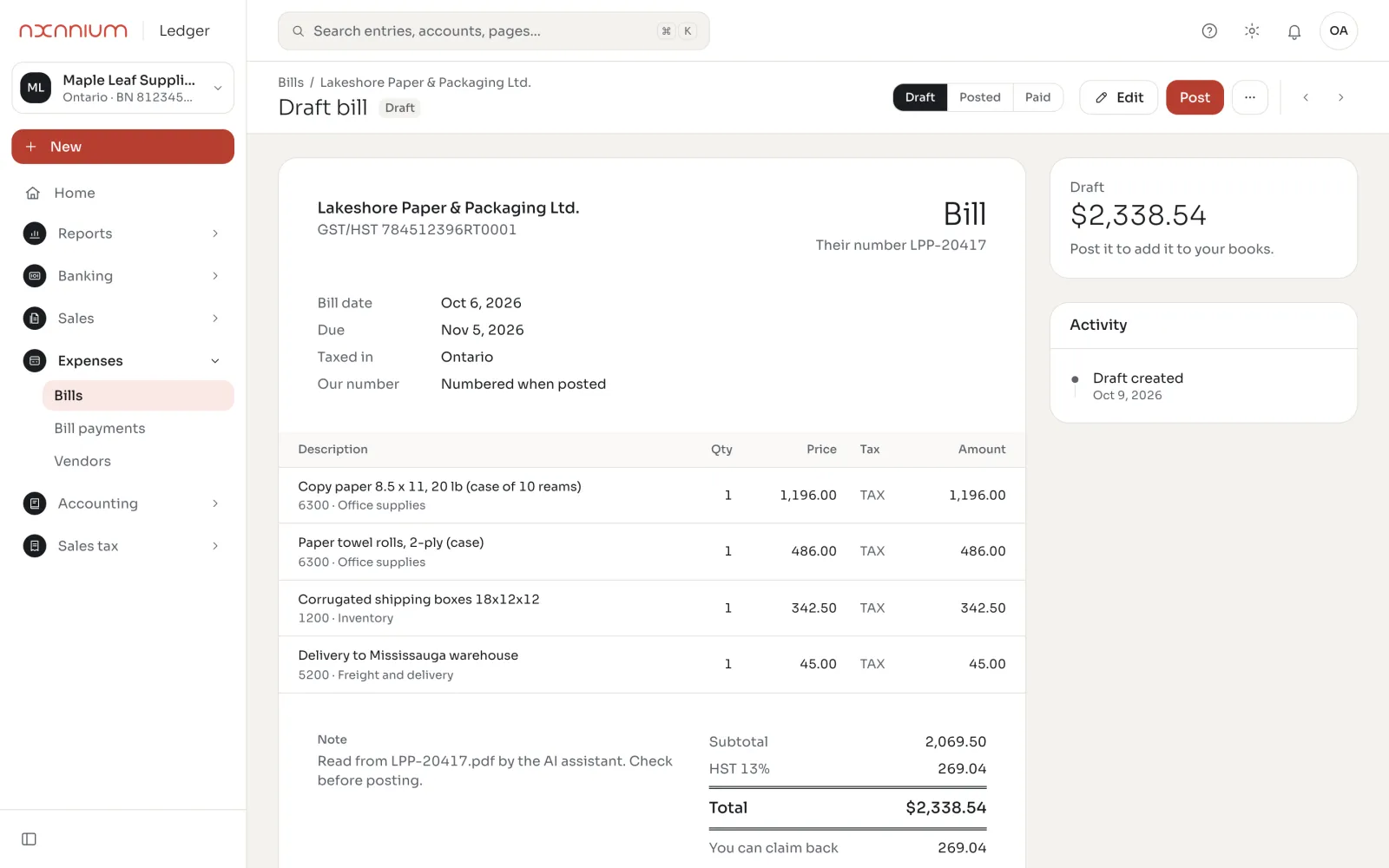
- Reading documents. Supplier bills and receipts read from a PDF or photo into a draft bill: supplier, date, amounts, GST/HST, lines.
Our introduction to AI accounting explains the ideas in more detail. This guide is about choosing.
Where AI gets Canadian bookkeeping wrong
General-purpose AI tools are trained mostly on other countries' rules. In Canada, and in BC in particular, the expensive mistakes are about tax:
- Input tax credits without evidence. A bank line saying "Staples $64.38" does not prove how much GST you paid. The CRA requires supporting records, and the detail depends on the amount (CRA). Software that claims ITCs from bank lines alone builds up credits you may not be able to defend.
- PST. BC PST paid on purchases is a cost, not a credit, and many services are exempt. A tool that treats every tax line the same will mis-code it.
- Place of supply. A BC business selling to Ontario charges HST, not GST plus PST. The customer's province decides the tax.
- Mixed and personal spending. AI cannot know that a Costco run was half office supplies and half groceries.
- Confident mistakes. AI can produce an answer that looks certain and is wrong. You want to see how sure it is, and what it based the suggestion on.
10 questions to ask before you choose
| Question | Why it matters |
|---|---|
| Does the AI post entries, or only suggest them? | Auto-posting is fast until it is wrong. You want review before posting. |
| Does it show a confidence level and the reason? | You need to know which suggestions to check. |
| Is there an audit log of who changed what? | Your accountant, and the CRA, may ask. |
| Does it handle GST, HST, PST and QST separately? | BC businesses deal with two sales taxes. |
| Does it claim ITCs only with a supporting bill? | Bank lines alone are not enough evidence. |
| Where is the data stored, and where does the AI process it? | Many AI services run outside Canada. Ask, and ask what is sent. |
| Can I switch the AI off? | You should stay in control of your own books. |
| Does it work with my current software? | Moving systems is a cost. Some tools work alongside QuickBooks Online. |
| Can I export everything? | Ledger, documents and history, in standard formats. |
| Who do I call when it is wrong? | Software alone does not answer questions. A service does. |
Software, or a service that uses AI
AI bookkeeping software suits owners who keep their own books and want the routine done faster. A bookkeeping service that uses AI suits owners who want the books done for them: the AI handles volume, and the bookkeeper handles judgement, sales tax and the monthly close. The cost difference is real, so compare it with the time you spend today. Our guide to what bookkeeping costs in BC puts numbers on each option.
If you use QuickBooks Online
In BC, QuickBooks gets more than six times the search interest of Xero, according to Google Trends. You do not have to leave it to get AI help. AxLedger connects to QuickBooks Online read-only and runs a books health check on the file: duplicates, unmatched payments, sales tax on the wrong code, old open items. Our bookkeepers then fix what it finds inside your QuickBooks. See QuickBooks Online bookkeeping.
How to tell whether it is working
After two or three months, the AI should be saving time you can measure. Track a few simple things:
- How many bank lines were matched or suggested correctly, and how many a person changed.
- How many days after month-end the books are closed.
- How many questions you, or your accountant, have to answer each month.
- Whether sales tax returns reconcile to the books without adjustments.
Red flags
- The vendor cannot say where your data is processed.
- Entries post without review, and there is no way to see what the AI decided.
- GST, HST and PST are lumped together, or there is no PST at all.
- Input tax credits claimed from bank lines with no bill attached.
- You cannot export your full history.
- Accuracy claims with no definition of how they were measured.
Data and privacy
Ask every provider the same two questions: where is my data stored, and what does the AI receive? Our answer is on our security page: the ledger, documents and backups are stored in a Canadian data centre. The AI assistant is a third-party service (Anthropic's Claude) that processes bank line details, account names, contact names and documents you upload outside Canada. Account numbers are masked, and no SIN or passwords are sent. You can switch the AI off.
A sensible way to start
- Start with a health check of your current books, so you know what the AI will be working with.
- Turn on rules and history matching first. They are predictable and easy to check.
- Add AI suggestions for the rest, and review them weekly at first.
- Keep bills and receipts flowing in, so sales tax is supported.
- Close and lock each month once it is reviewed.
Questions
Can AI do my bookkeeping on its own?
Not safely. AI is good at suggesting categories, matching payments and reading bills, but Canadian sales tax and unusual items need a person to check before anything is posted.
Is AI bookkeeping software accurate?
It depends on the tool and on review. Look for software that shows a confidence level, lets a person accept each suggestion, and keeps an audit log.
Does AI bookkeeping work with QuickBooks Online?
Yes, some tools work alongside it. AxLedger connects to QuickBooks Online read-only for a books health check, and our bookkeepers fix issues inside your QuickBooks.
Is my data safe with AI bookkeeping?
Ask where data is stored and what the AI receives. Axanium stores your ledger in Canada; the AI assistant processes limited details outside Canada, with account numbers masked, and can be switched off.
Sources
Want this handled for you?
Axanium is an AI-native services company for accounting and bookkeeping, based in Vancouver, BC. Book a 20-minute call and get a fixed monthly price.
Get a free books health check